How Asteraid works
The platform runs as two Docker containers: the Configuration Server builds and delivers settings to PBX's over SSH, while MongoDB provides reliable storage for all configurations. The result — a single control point for your entire Asterisk infrastructure.
- Generate configurations
- Send configurations via SSH
- Web Interface
- Store configurations
Thoughtfully designed
product.
We didn't copy other systems. Every feature in Asteraid is built from the real pain of IT admins and real-world use cases.
Everything you need to manage PBX
System Requirements
Minimum hardware and network requirements for deploying Asteraid.
Note: These are minimum requirements. Production environments typically require more resources. 2 CPU Core and 8 GB of RAM should be sufficient in most cases.
Manage your IP-PBX network
like a symphony orchestra
Every PBX, trunk, and call flow is an instrument waiting to be conducted. With Asteraid, you're the maestro — orchestrating your entire telephony infrastructure in perfect harmony. Real-time visibility, synchronized control, and harmonic efficiency across your entire network.
Download for Free
20+ management modules
in one interface
From real-time monitoring to SSH terminal — everything a telephony engineer needs.
Dialplan Rule Testing
Simulate a call flow through the dialplan directly from the Visual Dialplan Editor, using the administrator's phone to emulate an incoming call.
- Run call simulation from the editor without leaving the UI
- Use the admin's phone as the emulated incoming call source
- Create a full test environment to debug dialplan logic
- Validate routing rules before applying to production
- Catch errors before they reach live infrastructure
Disaster Recovery Readiness
Everything needed to restore the full configuration of the network of PBXs is stored in a single archive. All you need is a valid backup, the decryption key, and a new infrastructure to start. From new hardware to a fully operational service in just a few minutes.
- Entire PBX network config in one encrypted archive — PBX's, trunks, dialplans, users, certificates
- Restore requires only the backup file and decryption key — no manual reconfiguration
- New hardware → fully operational telephony in minutes, not days
- AES-encrypted backup with centralized key management
- Scheduled automatic backups and one-click full DUMP export
Version History & VM Boot Mode
Full version history support for the entire configuration. A backup snapshot is created every time the "Apply" button is pressed.
- Automatic snapshot on every configuration apply
- Browse and restore any previous configuration state
- Virtual Machine Boot mode support
- Never lose a working configuration
Multilingual Support
Multilingual support for voice files at the peer level. Each user can hear IVR prompts and system messages in their own language.
Real-time Monitoring
Via WebSocket the platform continuously receives and displays live metrics from all connected Asterisk PBX's.
Multi-PBX Management
Asteraid lets you add any number of Asterisk servers and manage them centrally.
Visual Dialplan Editor
Unique feature: build call routing via drag-and-drop block diagram powered by ReactFlow.
Call History (CDR)
Full call log via ODBC connection to the CDR database with powerful filters.
Extensions, Trunks & Queues
Full management of Asterisk telephony objects: extensions, trunks, templates, queues.
Active Directory Integration
Seamless user import from the corporate LDAP directory.
SSH Web Terminal
Full-featured SSH terminal right in the browser powered by xterm.js.
Firewall Management
Built-in firewall at PBX level with ipset support.
Config File Editor
Built-in Monaco editor (like VS Code) for direct Asterisk config file editing.
SSL Certificates
Certificate management for secure telephony with metadata display.
Action Log
Complete history of all system changes with diff view.
See what Asteraid looks like
Real screenshots from the live system — no mockups, no stock photos.
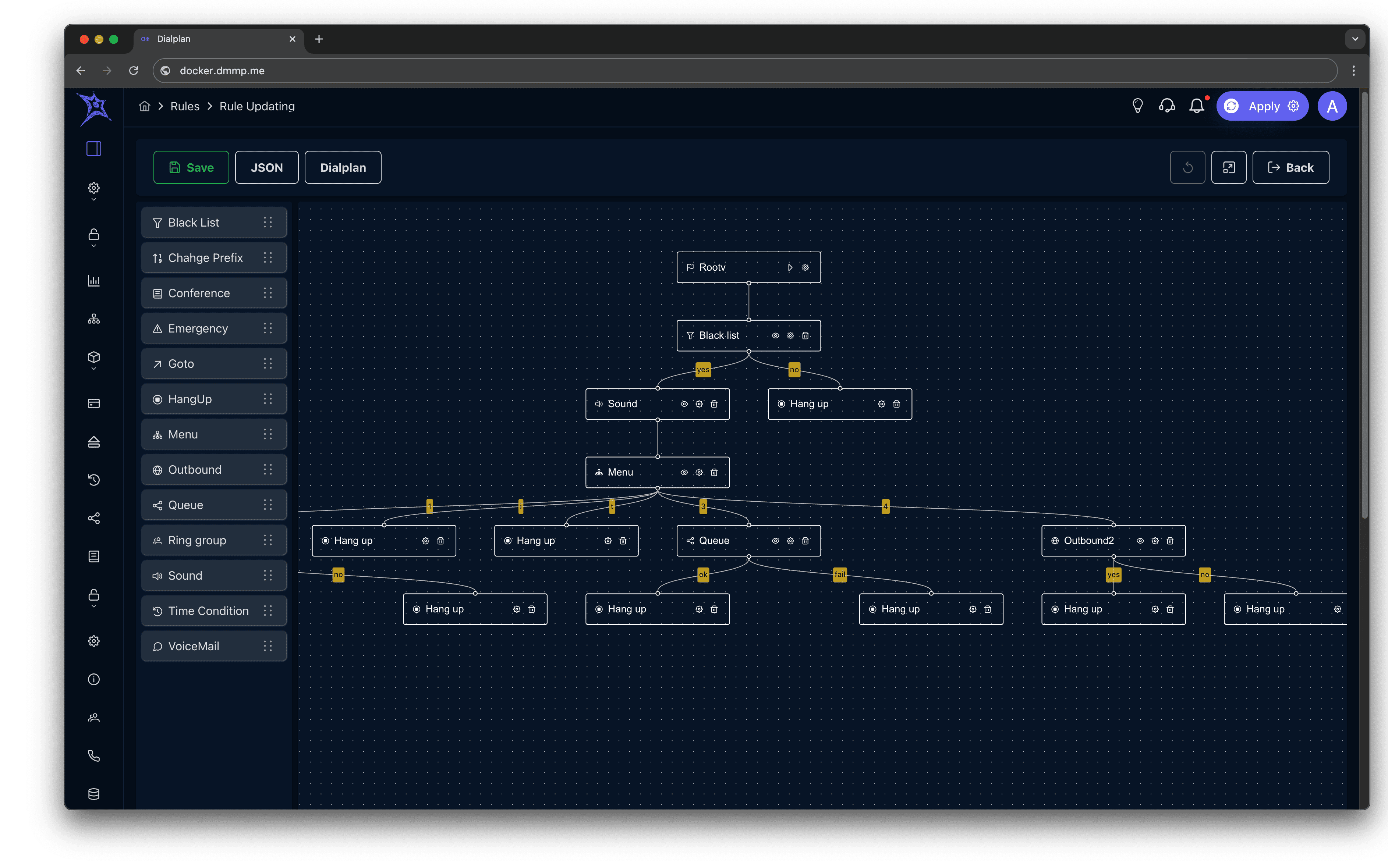
Visual Dialplan Editor
Build complex call routing without touching a single line of Asterisk config. Drag-and-drop blocks connect visually and generate real dialplan automatically.
- Drag-and-drop routing blocks: Queue, Hangup, Sound, Menu, Outbound
- Visual arrows between blocks — see the full call flow at a glance
- Generates valid Asterisk dialplan in real time
- Switch between visual and JSON/text view
- Save as reusable Rules templates
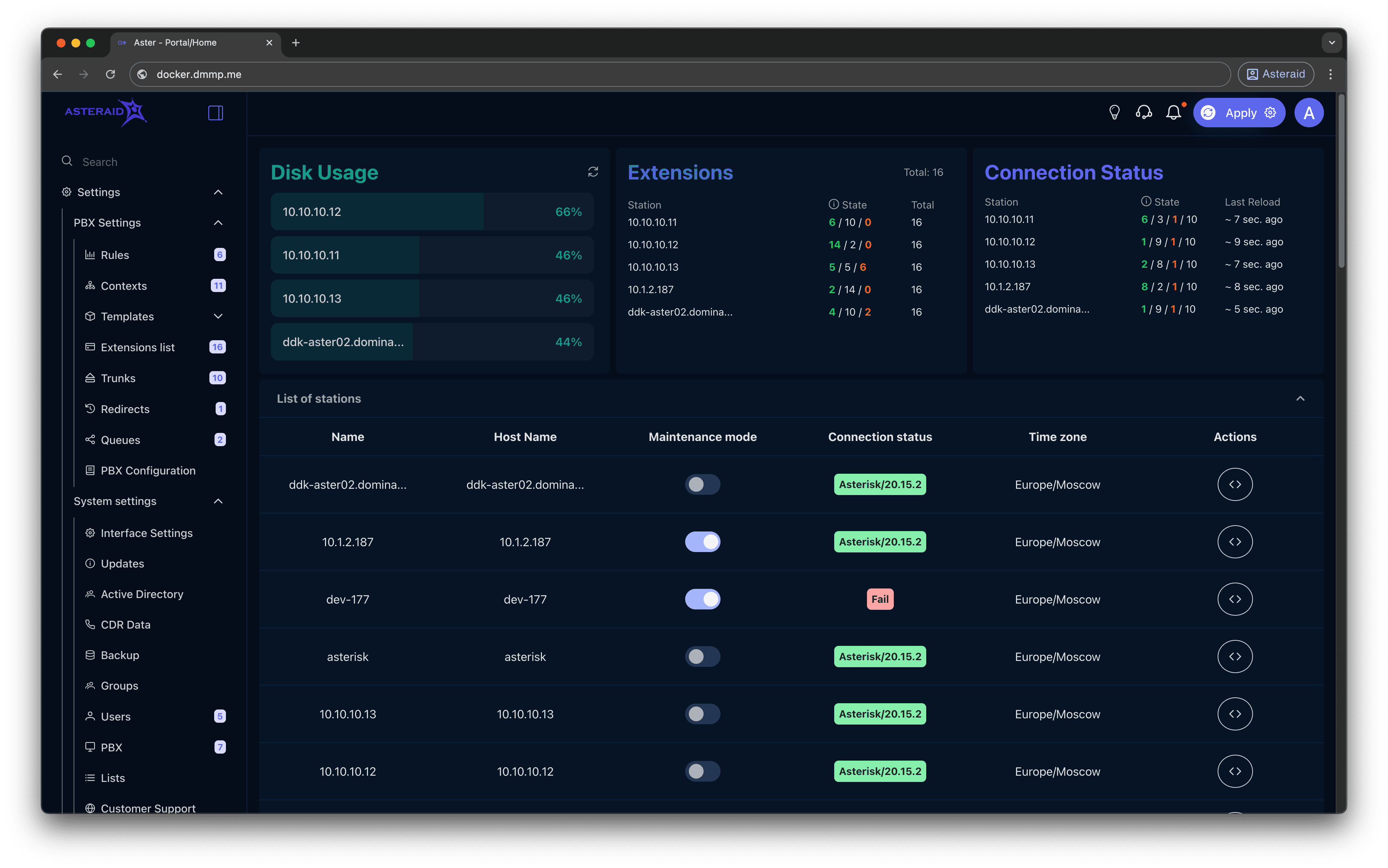
Each role — its own dashboard
4 role-based access levels. Each user sees only what they need for their work.
Administrator
Full access to all platform sections
- Summary widgets for all PBX's
- RAM, trunk and extension monitoring
- PBX list with live status
- Performance metrics
- User and role management
- System settings
How it works
From installation to a working platform — the initialization wizard walks you through all steps in 5 minutes.
Installation
Deploy Asteraid on your server. The step-by-step initialization wizard guides you through all settings in 5 minutes.
Connect PBX's
Add your Asterisk servers by hostname. Asteraid connects via SSH and starts monitoring automatically.
Set Up Users
Import employees from Active Directory or create them manually. Assign roles — each gets their own dashboard.
Manage Telephony
Trunks, extensions, queues, dialplans — all accessible from the browser. The visual routing editor works without Asterisk syntax knowledge.
Why choose
Asteraid
Built by IT engineers for IT engineers. No marketing fluff — just concrete solutions to concrete problems.
Asterisk management: before and after
The real difference between managing Asterisk manually and with Asteraid.
Frequently Asked Questions
Didn't find the answer? Write to us — we'll respond within a business day.
Ready to bring order
to your telephony?
Request a demo or deploy Asteraid yourself — the initialization wizard will guide you in 5 minutes.